
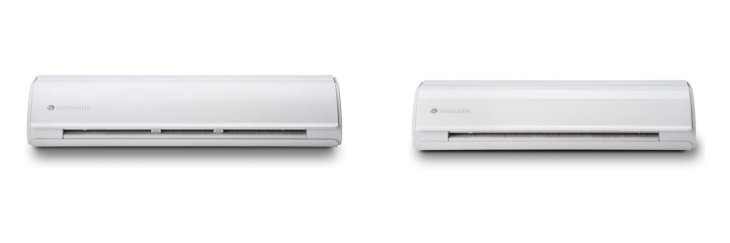
Cameo 5 vs Cameo 5 Plus – Check Which One Is Best & Why?
Cameo 5 Plus & Cameo 5 share many similarities, but there are also important differences, such as quality, performance, features, design, and connectivity. If you want the best one between them, I Would recommend the Cameo 5 Plus rather than the Cameo 5.
Why Do I Recommend The Cameo 5 Plus?
- The Cameo 5 Plus features a 15-inch maximum cutting width for creating larger decals, wall designs, and signage in a single pass, while the Cameo 5 supports only a 12-inch cutting width.
- Cameo 5 Plus supports 15×15 and 15×30 cutting mats for handling extended material sizes during wide-format projects, whereas the Cameo 5 is limited to 12×12 and 12×24 mats.
- It includes a 15-inch integrated roll feeder to manage long vinyl and heat transfer rolls smoothly, while the Cameo 5 includes a 12-inch roll feeder.
- The Cameo 5 Plus has a wider crosscutter assembly for trimming 15-inch rolls efficiently at the end of each cut, whereas the Cameo 5 uses a 12-inch crosscutter.
- Cameo 5 Plus comes with a larger chassis and wider pinch-roller alignment for improved media stability during long cuts, while the Cameo 5 maintains a compact roller setup.
- It supports 15-inch electrostatic mats to hold lightweight materials securely without adhesive, whereas the Cameo 5 supports only 12-inch electrostatic mats.
- The Cameo 5 Plus includes a higher-rated power adapter for sustaining performance during wide and long cutting sessions, while the Cameo 5 uses a standard adapter.
- Cameo 5 Plus allows approximately 15×30 inches maximum cutting area with a mat to accommodate larger creative layouts, whereas the Cameo 5 reaches only about 12×24 inches per cutting pass.
Maybe the Cameo 5 can make you comfortable because it’s a little bit cheaper than the Cameo 5 Plus. But you have to compromise all the above-mentioned features. Now the Decision is Yours. I hope it was helpful to choose the right one.
Side By Side Comparison
| Feature | Cameo 5 Plus | Cameo 5 |
| Maximum Cutting Width | 15 in | 12 in |
| Maximum Cutting Width (with Mat) | 14.6 in | 11.6 in |
| Supported Mat Sizes | 15×15, 15×30 | 12×12, 12×24 |
| Maximum Material Width (Roll) | 15 in | 12 in |
| Crosscutter Width | 15 in | 12 in |
| Pinch Roller Configuration | Wide dual-roller span | Standard roller span |
| Print & Cut Area | Larger registration marks | Standard registration marks |
| Electrostatic Mat Support | 15 in ES mat compatible | 12 in ES mat compatible |
| Chassis Width | 25 in approx | 22 in approx |
| Machine Weight | 7.8 kg | 6.3 kg |
| Included Cutting Mat | 15×15 | 12×12 |
| Noise Reduction | Slightly improved | Standard quiet mode |
| Workspace Requirement | Wider workspace | Compact workspace |
| Power Adapter Size | Higher capacity for extended load | Standard adapter |
| Carry Bag Compatibility | 15 in class | 12 in class |
| Accessory Cost | Larger mats/blades | Standard mats/blades |
| Optimal Use | Wide vinyl signage | Standard crafts and decals |
| Price | Check Cameo 5 Plus Price | Check Cameo 5 Price |
What Common Both Can Do?
- Bluetooth Connectivity: Both Cameo 5 Plus and Cameo 5 include Bluetooth, enabling wireless operation without USB cables. This allows placement flexibility and faster setup for craft rooms or small studios.
- Wi-Fi Connection (for updates): Each model connects via Wi-Fi for firmware updates and integration with Silhouette Studio. It simplifies device maintenance and ensures both stay compatible with new materials and tools.
- Automatic Tool Detection: Both cutters automatically recognize which tool is inserted in the carriage. This reduces manual input errors and streamlines switching between blades, pens, and specialty tools.
- Dual Carriage System: Each machine has a dual-carriage setup that allows two tools to be mounted at once. This enables sequential operations such as cutting and sketching in one job, improving workflow efficiency.
- 5000 gf Cutting Force: Both share a strong 5000-gram-force motor capable of handling dense materials like leather, felt, or chipboard. This ensures precise cuts even on thick or specialty craft media.
- Maximum Cutting Speed: Cameo 5 Plus and Cameo 5 both cut at up to 30 cm/s, ensuring quick output for large batches of designs. High-speed cutting helps meet production deadlines without compromising accuracy.
- Quiet Cutting Technology: Both models include advanced motion control and motor tuning for quieter operation. This is useful for home crafters or small studios where noise reduction improves comfort.
- Integrated Roll Feeder: Each machine has a built-in roll feeder, eliminating the need for external attachments. This helps users handle vinyl or heat-transfer rolls efficiently for longer projects.
- Crosscutter (Built-in): Both cutters incorporate a rear crosscutter to trim rolled material cleanly after cutting. It improves workflow and keeps vinyl projects neatly finished.
- Electrostatic Mat Support: Both are compatible with Silhouette’s electrostatic mats, enabling clean, adhesive-free placement for delicate or small materials. This offers precision for paper and thin films.
- Compatible Blade Type: Both models use the same AutoBlade Type B, maintaining consistency across projects and making replacement simple. Shared blade types reduce cost and confusion for owners using multiple machines.
- Material Thickness Support: Each cutter can process materials up to about 3 mm thick. This allows crafting with foam, felt, or leather without switching to specialized hardware.
- Tool Adapter Compatibility: Both accept tool adapters for legacy Silhouette accessories. This ensures older pens or blades can still be used, extending investment value for long-time users.
- Print & Cut Capability: Both Cameo 5 Plus and Cameo 5 can detect printed registration marks and cut around printed designs precisely. It’s essential for sticker sheets, labels, and photo-based crafts.
- PixScan Mat Compatibility: Each supports PixScan technology, allowing users to capture and cut precise outlines from scanned or photographed images. This enhances creative workflows involving custom artwork.
- Backlit Touch Panel: Both have a backlit control interface for easy operation in various lighting conditions. The illuminated buttons improve usability during night or low-light crafting sessions.
- Built-in Storage Compartment: Each model integrates onboard storage for blades and small tools. This keeps essential accessories organized and accessible right on the machine.
- USB Port (Firmware/Direct Cutting): Both provide a USB port for firmware updates and direct cutting from external drives. It adds versatility when working without a computer connection.
- Software Platform: Cameo 5 Plus and Cameo 5 both use Silhouette Studio v5 software for design, cutting, and print-and-cut tasks. This ensures full feature parity across the lineup.
- Operating System Support: Each cutter works seamlessly with Windows and macOS systems. This universal compatibility allows easy integration into existing digital-crafting setups.
Common Features
| Feature | Cameo 5 Plus | Cameo 5 |
| Bluetooth Connectivity | Yes | Yes |
| Wi-Fi Connection (for updates) | Yes | Yes |
| Automatic Tool Detection | Yes | Yes |
| Dual Carriage System | Yes | Yes |
| 5000 gf Cutting Force | Yes | Yes |
| Maximum Cutting Speed | 30 cm/s | 30 cm/s |
| Quiet Cutting Technology | Yes | Yes |
| Integrated Roll Feeder | Yes | Yes |
| Crosscutter (Built-in) | Yes | Yes |
| Electrostatic Mat Support | Yes | Yes |
| Compatible Blade Type | AutoBlade Type B | AutoBlade Type B |
| Material Thickness Support | Up to 3 mm | Up to 3 mm |
| Tool Adapter Compatibility | Yes | Yes |
| Print & Cut Capability | Yes | Yes |
| PixScan Mat Compatibility | Yes | Yes |
| Backlit Touch Panel | Yes | Yes |
| Built-in Storage Compartment | Yes | Yes |
| USB Port (Firmware/Direct Cutting) | Yes | Yes |
| Software Platform | Silhouette Studio v5 | Silhouette Studio v5 |
| Operating System Support | Windows & macOS | Windows & macOS |
| Price | Check Cameo 5 Plus Price | Check Cameo 5 Price |
FAQ
What is the maximum cutting width of the Cameo 5 Plus and Cameo 5? Do both models have the same cutting force? Can the Cameo 5 Plus and Cameo 5 work without being connected to a computer? Are the tools and blades interchangeable between Cameo 5 Plus and Cameo 5? What is the main difference between the Cameo 5 Plus and Cameo 5? Do both Cameo models support Print & Cut? Can both models use the new Electrostatic Mat? Is there a difference in noise level between the Cameo 5 Plus and Cameo 5? Do both machines require Silhouette Studio software? Can I use PixScan technology with both Cameo 5 models? Are both Cameo models compatible with Windows and macOS? Is Wi-Fi available on both Cameo 5 Plus and Cameo 5? Do both Cameo machines include a built-in roll feeder and crosscutter? What materials can both Cameo 5 models cut? Is there a difference in software features between the two? |


