
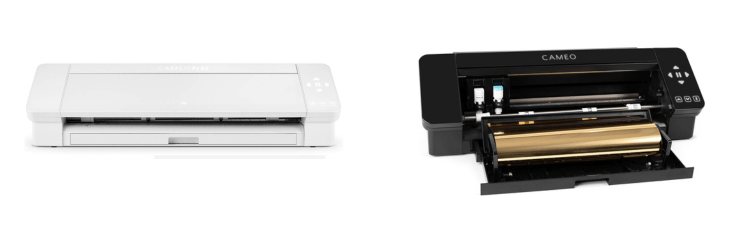
Cameo 4 vs Cameo 4 Plus – Check Which One Is Best & Why?
Cameo 4 Plus & Cameo 4 share many similarities, but there are also important differences, such as quality, performance, features, design, and connectivity. If you want the best one between them, I Would recommend the Cameo 4 Plus rather than the Cameo 4.
Why Do I Recommend The Cameo 4 Plus?
- The Cameo 4 Plus features a 15-inch cutting width for producing larger vinyl decals, posters, and heat-transfer projects in one pass, while the Cameo 4 supports only up to a 12-inch cutting width.
- Cameo 4 Plus comes with a 15×15-inch cutting mat for handling wider material sheets efficiently, whereas the Cameo 4 includes a smaller 12×12-inch mat.
- It includes an extended roller bar adjustment to support 15-inch media rolls for better stability during wide-format cuts, while the Cameo 4 has roller spacing restricted to 12-inch media.
- The Cameo 4 Plus has a broader built-in roll feeder to handle 15-inch rolls for seamless long cuts, whereas the Cameo 4’s feeder fits only up to 12-inch rolls.
- Cameo 4 Plus features a wider integrated crosscutter for trimming full 15-inch materials cleanly after long cuts, while the Cameo 4’s crosscutter accommodates only 12-inch material width.
- It has an 25.5 inches expanded chassis width to ensure proper media alignment and feed for large sheets, whereas the Cameo 4’s 22.4-inch body restricts working width.
- The Cameo 4 Plus comes with wider pinch-roller positions to improve tracking accuracy when cutting larger rolls, while the Cameo 4 uses narrower roller spacing.
- Cameo 4 Plus supports additional software presets for 13-inch and 15-inch widths to streamline design scaling for large-format output, whereas the Cameo 4 includes presets only up to 12-inch width.
Maybe the Cameo 4 can make you comfortable because it’s a little bit cheaper than the Cameo 4 Plus. But you have to compromise all the above-mentioned features. Now the Decision is Yours. I hope it was helpful to choose the right one.
Side By Side Comparison
| Feature | Cameo 4 Plus | Cameo 4 |
| Max cutting width (mat) | ~14.6 in cuttable on 15×15 mat | ~11.7 in cuttable on 12×12 mat |
| Max media width (rollers) | Up to 15 in | Up to 12 in |
| Included mat size | 15 × 15 in | 12 × 12 in |
| Built-in roll feeder support | Up to 15-in rolls | Up to 12-in rolls |
| Crosscutter width | ~15 in path | ~12 in path |
| Pinch-roller spacing range | Positions up to 15 in | Positions up to 12 in |
| Preset roller width options | Letter/12/13/15 in | Letter/12 in |
| Max matless cut width | ~14.6 in | ~11.7 in |
| Max on-mat cut area (W×L) | ~14.6 × 15 in | ~11.7 × 12 in |
| Machine width | ~25.5 in | ~22.4 in |
| Machine weight | ~5.4 kg | ~4.7 kg |
| Desk footprint (WxD) | Wider chassis, same depth | Narrower chassis, same depth |
| Front/back clearance need | More space for wide media | Less space for narrow media |
| Mat alignment guides | 15-in track width | 12-in track width |
| Feeder roller span | Wider roller span | Standard roller span |
| Typical price (relative) | Higher | Lower |
| Compatible mat family | 15-in mats | 12-in mats |
| Shipping carton width (relative) | Larger | Smaller |
| Media width presets in software | Adds 15-in presets | Up to 12-in presets |
| Ideal use case (width) | Wider designs in one pass | Standard-width designs |
| Price | Check Cameo 4 Plus Price | Check Cameo 4 Price |
What Common Both Can Do?
- Cutting Force: Both the Cameo 4 Plus and Cameo 4 provide up to 5 kg of cutting force, allowing them to cut thicker and denser materials like leather, chipboard, and craft foam with precision. This strength gives users professional-grade cutting capabilities for a wide range of projects.
- Max Material Thickness: Each model can handle materials up to 3 mm thick, ensuring compatibility with a variety of crafting and DIY materials. This similarity is ideal for users who work with layered designs or tougher materials such as felt or balsa wood.
- Dual Carriage System: Both feature a dual carriage setup that allows users to use two tools at once — for instance, cutting and sketching simultaneously. This saves time and improves workflow efficiency for more complex projects.
- Automatic Tool Detection: Each machine automatically recognizes the inserted tool, adjusting settings in the Silhouette Studio software accordingly. This automation prevents manual setup errors and simplifies operation for beginners and professionals alike.
- Bluetooth Connectivity: Both models include built-in Bluetooth, enabling wireless communication with computers or tablets. This makes placement more flexible, as users don’t need to keep the cutter right beside their workstation.
- USB Connection: Each machine includes a USB port for direct wired connection to a computer, ensuring stable data transfer during long or detailed cuts. This option is useful when working with high-resolution or complex vector files.
- Built-in Roll Feeder: The Cameo 4 and 4 Plus both have integrated roll feeders for handling long rolls of vinyl or heat-transfer materials. This makes them excellent choices for sign-making or apparel applications.
- Built-in Crosscutter: Both models include a rear crosscutter for trimming rolled materials cleanly after cutting. This feature saves time and reduces waste when working with continuous rolls.
- Print & Cut Function: Each model supports the print-and-cut workflow, where users can print a design on a regular printer and then use registration marks to cut precisely around it. This is popular for sticker creation and printable vinyl projects.
- PixScan Compatibility: Both machines are compatible with PixScan technology, allowing users to scan or photograph material and accurately align cuts over printed images or hand-drawn designs. This enhances precision and creative freedom.
- Matless Cutting (Pop-Out/Kiss-Cut): Both cutters can perform matless cuts directly on certain materials, like vinyl or sticker sheets. This helps reduce consumable costs and simplifies setup for frequent cutting sessions.
- Touch Control Panel: Each device includes an intuitive touch panel for basic control and navigation without needing to use a computer. It provides direct access to essential operations like load, unload, and test cut.
- LED Indicator Lighting: Both models use LED lighting around the carriage area to indicate operational status, tool detection, or error alerts. This gives users quick visual feedback during operation.
- Compatible Tools (AutoBlade, Rotary, Kraft, Punch): Each supports the same family of tools, giving users flexibility for various materials and crafting techniques. This shared compatibility ensures seamless transition between models.
- Software Compatibility (Silhouette Studio): Both work with Silhouette Studio software, which provides advanced design and cutting control. Users can share projects or workflows between machines without needing to relearn the interface.
- Cutting Speed: Both machines reach up to approximately 30 cm/s, maintaining the same level of efficiency and precision for high-volume or detailed cuts. This ensures uniform performance between sizes.
- Supported Material Types: Each cutter supports a wide range of materials, from paper and vinyl to heat transfer and fabric. This versatility makes them suitable for everything from hobby crafting to small business production.
- Built-in Storage for Tools: Both include small internal compartments for storing extra blades or tools, keeping the workspace organized and reducing the chance of losing accessories.
- Cross-platform Support (Windows/Mac): Both Cameo 4 and Cameo 4 Plus work seamlessly with Windows and macOS, providing flexibility regardless of the user’s operating system.
- Carriage Type: Each machine uses a dual-motor carriage design — one for speed and one for power — balancing fast cuts for thin materials with strong pressure for thicker ones. This hybrid system ensures accuracy and versatility across all materials.
Common Features
| Feature | Cameo 4 Plus | Cameo 4 |
| Cutting Force | 5 kg | 5 kg |
| Max Material Thickness | 3 mm | 3 mm |
| Dual Carriage System | Yes | Yes |
| Automatic Tool Detection | Yes | Yes |
| Bluetooth Connectivity | Yes | Yes |
| USB Connection | Yes | Yes |
| Built-in Roll Feeder | Yes | Yes |
| Built-in Crosscutter | Yes | Yes |
| Print & Cut Function | Yes | Yes |
| PixScan Compatibility | Yes | Yes |
| Matless Cutting (Pop-Out/Kiss-Cut) | Yes | Yes |
| Touch Control Panel | Yes | Yes |
| LED Indicator Lighting | Yes | Yes |
| Compatible Tools (AutoBlade, Rotary, Kraft, Punch) | Yes | Yes |
| Software Compatibility (Silhouette Studio) | Yes | Yes |
| Cutting Speed | Up to 30 cm/s | Up to 30 cm/s |
| Supported Material Types | Vinyl, Cardstock, Heat Transfer, Fabric | Vinyl, Cardstock, Heat Transfer, Fabric |
| Built-in Storage for Tools | Yes | Yes |
| Cross-platform Support (Windows/Mac) | Yes | Yes |
| Carriage Type | Dual Motor | Dual Motor |
| Price | Check Cameo 4 Plus Price | Check Cameo 4 Price |
FAQ
Can the Cameo 4 Plus cut larger materials than the Cameo 4? Do both machines have the same cutting power? Is there any difference in cutting length between the two models? Are the tools and blades interchangeable between Cameo 4 and Cameo 4 Plus? Do both models support Bluetooth connectivity? Do the Cameo 4 and Cameo 4 Plus use the same software? Are cutting mats different for the two models? Is there any difference in cutting precision or quality? Can both machines perform matless cutting? Do both models come with built-in roll feeders? Do they require an internet connection to operate? Can I use both machines with a Mac or Windows computer? Are the Cameo 4 and Cameo 4 Plus suitable for commercial use? Do both models include automatic tool detection? Which one is better for small spaces? |


